


Blue Snowball iCE USB Microphone – Plug-and-Play Recording for Podcasts, Streaming & Voice Calls
The Blue Snowball iCE delivers professional-quality audio without the complexity of traditional studio gear. We designed this cardioid condenser microphone to give you broadcast-level sound quality right out of the box—just plug it into your Mac or PC and start recording.
Whether you're hosting a podcast, streaming on Twitch, recording YouTube voiceovers, or taking video calls, the Snowball iCE captures your voice with exceptional clarity and warmth. The custom cardioid capsule focuses on your voice while minimizing background noise, so you sound polished and professional every time.
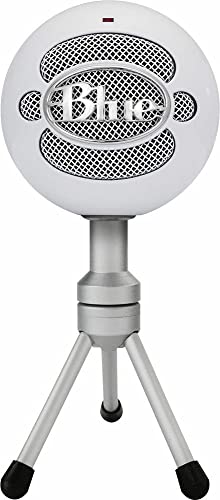
Our iconic ball-shaped design isn't just distinctive—it's functional. The adjustable desktop stand lets you position the mic at the perfect angle, and the durable construction ensures years of reliable performance. At under 100 dollars in most markets, Snowball iCE offers incredible value for creators, streamers, and remote professionals who refuse to compromise on audio quality.
What makes Snowball iCE different
Cardioid Capsule Technology & Audio Performance
The Blue Snowball iCE features our proprietary cardioid condenser capsule engineered specifically for vocal capture. Unlike omnidirectional microphones that pick up sound from all directions, the cardioid pattern focuses on audio directly in front of the mic while rejecting ambient noise from the sides and rear.
This focused pickup pattern is ideal for home recording environments where you can’t control every sound source. Your voice remains front and center while keyboard clicks, fan noise, and room echo fade into the background. The custom-tuned capsule delivers a frequency response optimized for spoken word—warm low-mids for body, clear highs for articulation, and a gentle presence boost that makes your voice cut through mixes without sounding harsh.
Plug-and-Play USB Setup & Software Compatibility
We believe great audio shouldn’t require an engineering degree. The Snowball iCE uses class-compliant USB connectivity that works instantly with Mac OS X, Windows, and Chrome OS—no drivers, no software installation, no configuration menus.
Simply connect the included USB cable to your computer and select Snowball iCE as your input device in your recording software or communication app. The microphone draws power directly from the USB connection, so there’s no external power supply to manage. Within 30 seconds of opening the box, you can be recording professional-quality audio.
Desktop Stand & Mounting Options
The Snowball iCE includes our custom-designed adjustable desktop stand that lets you angle the microphone precisely toward your voice. The heavy-weighted base keeps the mic stable during animated streaming sessions or energetic podcast recordings, while the pivot joint locks securely at any angle.
The stand features a standard 5/8-inch threaded insert that’s compatible with any professional boom arm or microphone stand. Many users upgrade to a boom arm for additional positioning flexibility—mounting the Snowball iCE on an articulating arm lets you position it closer to your mouth for more intimate vocal presence, then swing it out of camera frame when you’re not recording.
Complete Your Blue Recording Setup


Rated 4.8 by verified buyers


Blue Snowball iCE Questions
Yes, the Snowball iCE uses class-compliant USB technology that works instantly with Mac OS X (10.4 or later), Windows (XP through Windows 11), and Chrome OS—no drivers required. Simply plug the included USB cable into your computer and select Snowball iCE as your audio input device. The microphone is compatible with all major recording software, streaming platforms, and communication apps including OBS, Audacity, GarageBand, Discord, Zoom, Skype, and Google Meet.
The Snowball iCE also works with PlayStation 4, PlayStation 5, and gaming consoles that support USB audio input. Just connect the mic to an available USB port and configure it as your chat microphone in the console settings.
The Snowball iCE features a single cardioid pickup pattern optimized specifically for vocal recording, while the original Snowball offers switchable cardioid and omnidirectional patterns. We designed Snowball iCE for creators who need excellent vocal capture at an accessible price point—under 100 dollars in most markets.
The streamlined single-pattern design allows us to focus entirely on perfecting cardioid performance for podcasting, streaming, and voice calls. For most solo creators, the cardioid-only configuration is ideal because it rejects background noise and room echo better than omnidirectional mode. If you need multiple pickup patterns for recording groups or ambient sound, consider our Blue Yeti which offers four switchable patterns.
For optimal audio quality, position the Snowball iCE approximately 6-8 inches from your mouth, aimed slightly off-axis rather than speaking directly into the top of the grille. This distance provides the best balance of presence and room tone while minimizing proximity effect and plosive sounds from P and B consonants.
If you're recording in a noisy environment, moving slightly closer (4-6 inches) increases the ratio of your voice to background noise. Conversely, moving farther away (10-12 inches) creates a more natural, conversational tone ideal for podcast interviews or roundtable discussions. The cardioid pattern remains focused and clear across this range, rejecting off-axis sound regardless of your exact positioning.
Absolutely. The Snowball iCE includes an adjustable desktop stand with a standard 5/8-inch (27 threads per inch) threaded mount that's compatible with any professional boom arm, microphone stand, or suspension mount. Many users upgrade to our Compass boom arm for enhanced positioning flexibility and to free up desk space.
When using a boom arm, you can position the Snowball iCE closer to your mouth for more intimate vocal presence while keeping it out of camera frame during streaming or video recording. The microphone weighs just over one pound, so even lightweight boom arms can support it securely. The standard threading ensures compatibility with industry-standard audio equipment from any manufacturer.
The Snowball iCE does not include a built-in headphone jack. This design decision allows us to dedicate the full internal architecture to pristine audio capture while keeping the price accessible—typically under 100 dollars.
You can monitor your audio in real-time through your computer's headphone output or audio interface. Most recording software including Audacity, OBS, and GarageBand offers software monitoring options with adjustable latency. For zero-latency monitoring during music recording or live streaming, we recommend using an audio interface with direct monitoring capabilities. Many users prefer this setup because it provides more flexible monitoring control than microphone-mounted headphone jacks.
The Snowball iCE works with all major recording and streaming software—there's no proprietary Blue software required. For podcasting, we recommend Audacity (free, cross-platform) or GarageBand (free on Mac). For streaming, OBS Studio (free) and Streamlabs OBS are excellent choices that integrate seamlessly with Twitch, YouTube, and Facebook Gaming.
For voice calls and remote work, Snowball iCE integrates perfectly with Zoom, Microsoft Teams, Google Meet, Discord, and Skype—simply select it as your microphone in the app's audio settings. The class-compliant USB design means the microphone appears as a standard audio input device, so even specialized recording software like Reaper, Adobe Audition, or Pro Tools recognizes it immediately without configuration.
The Snowball iCE's cardioid pickup pattern is specifically designed to minimize background noise by focusing on sound directly in front of the microphone while rejecting audio from the sides and rear. Position the microphone so that noise sources (fans, air conditioning, traffic) are behind or beside the mic rather than in front of it.
For additional noise reduction, record in the quietest space available and add soft furnishings like curtains, rugs, or acoustic panels to absorb room echo. Position the Snowball iCE 6-8 inches from your mouth to maximize the ratio of your voice to ambient sound. Our foam windscreen further reduces air conditioning noise and breath sounds. Most recording software also includes noise reduction filters you can apply during editing for even cleaner results.